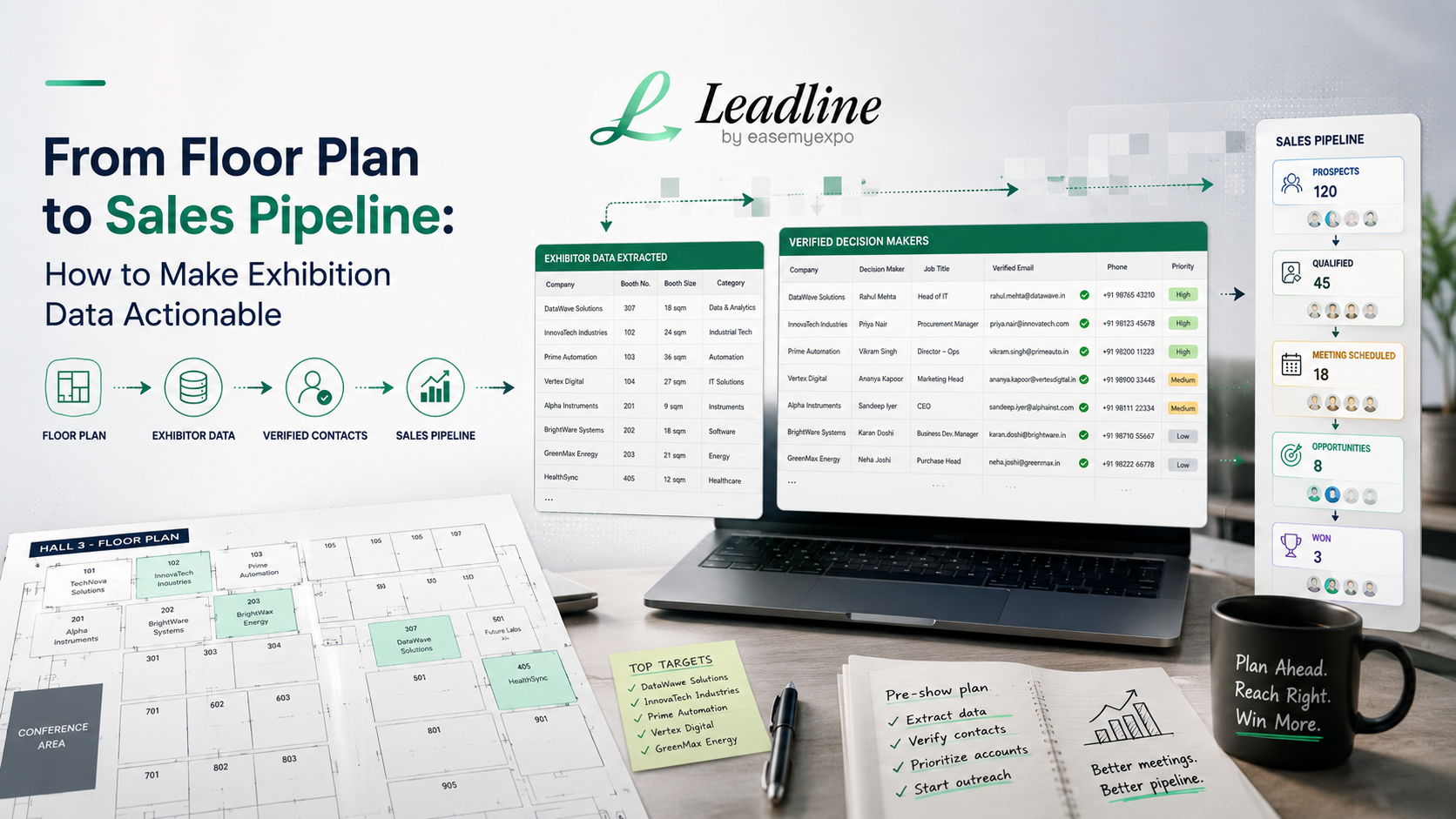
From Floor Plan to Sales Pipeline: How to Make Exhibition Data Actionable
Last updated: September 1, 2026
The floor plan was released three weeks ago. You opened it up once, zoomed in and found your own booth, said out loud "cool" and closed the tab. It's been lying there, waiting to pass judgment on you, since you put it in your Downloads folder, between a screenshot you don't recall taking and a file named something like "final_v2_ACTUAL.pdf ”. In the meantime, some other one of this show's competitors opened the same PDF and noticed a call list on the other side of the show floor. Wait a minute before opening the tab, they're three conversations deep.
Same file, two completely different outcomes. That's the whole story of exhibition data for sales in one sentence. Most teams treat the floor plan as a map they check once. The teams that win the floor treat it as a mailing list with better production values.
Quick answer: A well-designed trade show floor plan can help you leverage booth/company lists to create a structured database that includes a verified decision maker contact on each company, scores the accounts you'll be targeting by fit, and get a list of the top accounts into your system before the show, not after.
Before you start, here's what you need
- The floor plan or exhibitor list itself, in whatever format the organizer published (PDF, image, or webpage)
- A spare hour, or a tool that can skip that hour for you
- A rough sense of what a "good fit" account looks like for your team, since not every exhibitor is worth the same effort
- Somewhere to put the finished list, a CRM, a spreadsheet, or a sequence tool, so the work doesn't just sit there like the PDF did
If you're not sure which shows deserve this effort in the first place, sort that out before step one.
Check upcoming shows: Leadline's trade show calendar
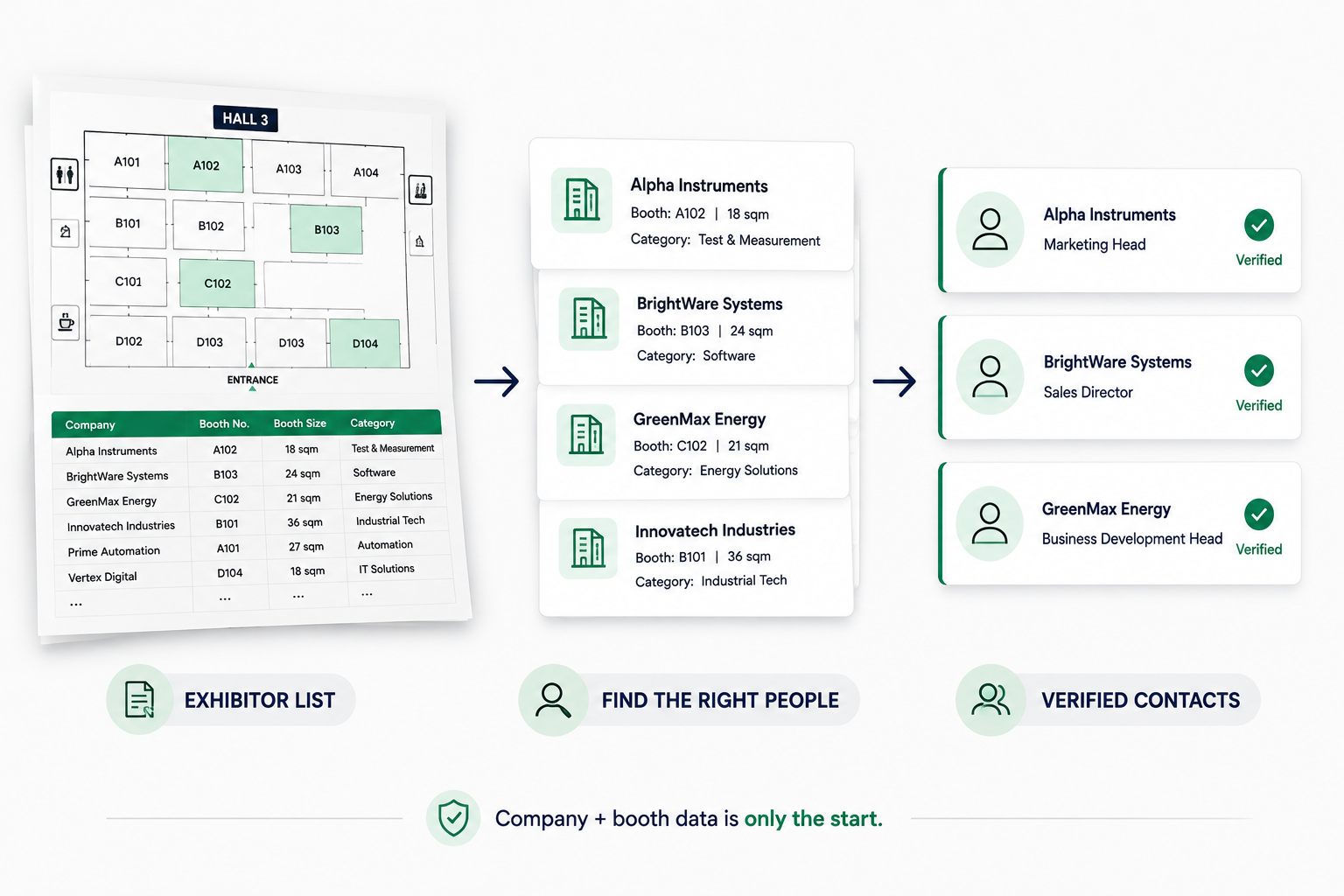
Step 1: Remove the exhibitor list from the floor plan.
Create the raw list from the source it came from. This seems like a short task, and it is, but it isn't. Booth numbers are distributed along a visual arrangement, not in rows awaiting to be copied, as are company names, since floor plans are created for a human that walks a hall with a coffee in hand rather than a spreadsheet.
Step 2: Make it manageable!
If you have a list, create columns: company name, booth number, booth size, category and then a blank column for everything you will be adding. Also take note of the size and location of the capture booth. They may appear cosmetic, but if the company has a larger, more central exhibit, it's a good sign of how serious they are about the show and how big a company they are.
Step 3: Attach the right contact to each company
This is the step where a list becomes a pipeline. It's also where most manual processes fall apart, because guessing an email format for 200 companies is a full week nobody has before a show. A tool like Leadline attaches verified decision-maker data here instead, checked emails and direct phones, matched against live contact data rather than a best guess.
Step 4: Verify before you send anything
An unverified contact is worse than no contact at all, it burns a touch on a bounce or the wrong person instead of a conversation, and you don't get that touch back. Whatever handles enrichment, make sure it checks against live mail servers before the list goes anywhere near an outreach sequence.
Step 5: Prioritize, don't blast
A big list doesn't mean every company on it matters equally. A simple scoring pass, booth size, industry fit, whether they look like a buyer rather than another vendor sharing the same floor, turns a flat list into a ranked one. That's the difference between emailing 400 companies and talking to the 40 that mattered.
Read more: How to find decision-makers at a company
Step 6: Load it and go before the show, not after
Get the prioritized list into your CRM or sequence tool while there's still time to use it. Most trade show leads never get a real follow-up at all, up to 80% by some industry estimates, and that gap exists because teams wait until they're back at the office, jet-lagged, staring at a pile of badge scans. A list built ahead of time skips that entirely.
Source: Trade Show PRO's 2026 exhibitor statistics
Why this beats waiting for the show floor
Booth conversations still matter, but they only reach whoever happens to wander by your table during the hours you're staffed. A list built from the floor plan skips that gamble. You decide in advance who matters and reach them on your own timeline. Leadline exists for exactly this: paste a floor plan or directory URL, and get back a verified, prioritized contact list instead of a PDF full of boxes and someone else's booth numbers.
See it in action: HBLF Show 2026 exhibitor list guide
However many shows are on your calendar this quarter, the cost per show is usually smaller than people expect once it's priced out against a rep's week.
FAQ
What is the best use of a trade show floor plan for sales prospecting?
Turn the exhibitor list into a structured database, add a verified decision-maker contact for each company, assess their exhibit "fit" and upload the prioritized list into a CRM or outreach sequence prior to the show beginning.
What information is important other than company names on a floor plan?
The most helpful extras are booth size and location. If a company pays to have a bigger, more central booth, it is likely that they are paying more for the show as a whole, which is a good indicator.
Is it possible to do this for a floor plan that is simply an image or pdf?
Yes. It is not so easy to do by hand, as someone will have to manually type booth numbers and company names, but the extraction tools are made for this format.
Before or after the show is outreach. Before, if possible. While the show is ongoing you have a natural reason to speak to the decision maker, but after the show, you don't.
Which shows should I do this for?
Begin at the biggest event in your industry for the year and work down. If you don't have a short list of trade shows to choose from, Leadline's trade show calendar is a good place to start.
Turn the Floor Plan Into Your Next Sales List
The exhibitor list is already there. The companies are already spending money to be at the show.
The only question is whether you reach the right people before everyone else does.
Turn any exhibitor list or floor plan into verified decision-maker contacts with Leadline.
→ Find the right exhibitors. Get verified contacts. Start outreach before the show.